© 2026 Coreware Limited. All rights reserved.
llfix is a low-latency FIX protocol engine developed by Coreware Limited. This manual applies to both the open-source (MIT-licensed) edition and the commercial edition of llfix.
llfix is a product of Coreware Limited.
Introduction
llfix is a high-performance, low-latency FIX protocol engine designed for latency-sensitive systems. It focuses on deterministic performance, minimal overhead, achieving single-digit microsecond message encoding and decoding without memory allocations on latency-critical paths.
llfix is header-only, written in modern C++17, and supports both Linux and Windows on x86 systems, making it easy to integrate into existing infrastructures. The engine operates exclusively in immediate mode, avoids internal message queueing, and provides optimised time access, fast virtual-memory-based serialisation, and built-in operational tooling. llfix is suitable for environments where predictability, transparency, and performance are critical, from colocated trading systems to high-throughput FIX gateways.
Release notes
1.0.8 : 03 Aug 2026
- Removed other FIX engine benchmarks as they are now available in https://github.com/CorewareLtd/fix-engine-benchmarks
1.0.7 : 31 July 2026
- llfix::ObjectCache now allocates objects in contiguous blocks to reduce cache misses
- Switching to a stack based freelist model in hasyncer's memory pool
- OnixS benchmark: Using two separated isolated cores , one for bm thread one for OnixS sending thread
- QuickFix benchmark: Switching to ThreadedSocketInitiator which writes to socket syncronously on the benchmark thread
- Adding B2BITs FIX antenna benchmark
1.0.6 : 27 July 2026
- Made serialisation_path_reader part of the engine as it is required by both HA and observability
- High availability throughput improvement: hasyncer now serialises messages asyncronously and added new config serialiser_worker_thread_count
- SPSCBoundedQueue capacities now have to be power of two.
1.0.5 : 19 July 2026
- Added OnixS engine FIX client benchmark
1.0.4 : 27 June 2026
- Root privilege requirement narrowed in scope: now required only when lock_pages is enabled
- TcpReactorScalable now emits a warning to stderr when the host has only one physical core
- FixServer::does_any_session_use_path no longer checks serialisation paths when message serialisation is disabled
1.0.3 : 30 May 2026
- Added new examples 'programmatic_administration' & 'docker'
- High availability message syncing throughput improvements and new reliability config: 'message_request_retry_microseconds'
- High availability renamed 'max_request_message_count_per_query_response' config to 'max_message_batch_size'
- Removed .p2align 5 from hot TX/RX loops to avoid constraining PGO users
1.0.2 : 10 May 2026
- Added new examples 'order_router' and 'otlp'
- Correcting high availability example's configuration
- Added const_iterator for llfix::IncomingFixMessage
1.0.1 : 12 April 2026
- Fixed potential compiler reordering issue and switched to TTAS from TAS in UserspaceSpinlock
- Additional error logging for llfix::MemoryMappedFile::flush failures
1.0.0 : 16 March 2026
- Initial version
How to build
llfix can be built using GCC, Clang, or MSVC. The compiler must support C++17. It can be built either in header-only mode or as a static library.
For header-only usage, add the <llfix_root>/include directory to your compiler’s include path.
For static library usage, build the library using CMake in the <llfix_root>/lib directory. Then add the <llfix_root>/include directory to your compiler’s include path and link the llfix static library in your linker settings. Available CMake options are described in the CMake Support section. When using the static library build, always include llfix/common.h or llfix/engine.h to avoid potential ODR or ABI inconsistencies.
On Linux, you must also link with -pthread.
Windows note: Always include llfix/engine.h before any Windows networking headers. This avoids conflicts between ws2tcpip.h and windows.h, and ensures that the maximum number of socket descriptors that can be monitored is configured correctly.
Building with dependencies
The following optional components can be enabled at build time. Each dependency requires specific preprocessor definitions and build and runtime configuration, as detailed below.
All define requirements listed below must be set at the build level (via compiler settings or target_compile_definitions), not inside individual source files, to avoid ODR/ABI mismatches.
Tinyxml2
| Requirement | Description |
|---|---|
| Defines | -DLLFIX_ENABLE_DICTIONARY |
| Includes | <llfix_root_directory>/deps/tinyxml2/include/ , provided in the commercial edition repo |
| Linker | Lib path <llfix_root_directory>/deps/tinyxml2/lib and -ltinyxml2 on Linux, tinyxml2.lib on Windows, both provided in the commercial edition repo |
| Runtime | N/A |
Note: The provided Linux static libraries are built against RHEL 9.4’s C++ runtime. To build a static library for your distribution, use deps/tinyxml2/CMakeLists.txt :
On Windows, the provided libs are built with /MD (Release) and /MDd (Debug). If your project uses /MT or /MTd, change the runtime library setting in the generated Visual Studio project and rebuild tinyxml2.
LibNUMA (Linux only)
| Requirement | Description |
|---|---|
| Defines | -DLLFIX_ENABLE_NUMA |
| Includes | Libnuma headers must be available on the build host |
| Linker | -lnuma |
| Runtime | so file should be available on the runtime host |
OpenSSL (version 3.6 or newer)
| Requirement | Description |
|---|---|
| Defines | -DLLFIX_ENABLE_OPENSSL |
| Includes | OpenSSL headers must be available on the build host |
| Linker | -lssl -lcrypto on Linux, libcrypto.lib libssl.lib required on Windows |
| Runtime | so/dll files should be available on the runtime host |
As an additional step on Windows, you must add OpenSSL’s applink.c to your project sources and build it as part of the application.
Solarflare TCPDirect (Linux only)
| Requirement | Description |
|---|---|
| Defines | -DLLFIX_ENABLE_TCPDIRECT |
| Includes | TCPDirect headers must be available on the build host |
| Linker | -lonload_zf_static |
| Runtime | A functional Solarflare Onload is required at runtime. This dependency applies regardless of whether the application is Onload'ed or uses TCPDirect. |
CMake support
You can also find llfix.cmake in the llfix root directory, which can be used as a stand alone helper CMake file for integrating llfix into projects that use CMake. The minimum required CMake version is 3.8. The examples in the examples directory make use of this file.
The CMake options you can pass to llfix.cmake :
| Option | Description |
|---|---|
| -DLLFIX_STATIC_LIB=ON | llfix as a static library (Default mode is header-only) |
| -DLLFIX_ENABLE_NUMA=ON | LibNUMA |
| -DLLFIX_ENABLE_DICTIONARY=ON | FIX dictionary support |
| -DLLFIX_ENABLE_OPENSSL=ON | OpenSSL support |
| -DLLFIX_ENABLE_TCPDIRECT=ON | Solarflare TCPDirect support |
As for OpenSSL option, if the OPENSSL_ROOT_DIR environment variable is not set, llfix will attempt to include and link against the system-provided OpenSSL installation. If it is set, both include paths and libraries will be taken from that directory.
The OPENSSL_ROOT_DIR directory must contain both an include and a lib folder on Linux and Windows. The lib folder must contain the following files:
- On Linux: libssl.so, libcrypto.so
- On Windows: libssl.lib, libcrypto.lib
Additionally on Windows, it must contain "ms" folder with the following OpenSSL file: applink.c .
Configs
llfix uses a simple, human-readable configuration file format based on INI files similar to Quickfix :
- Lines starting with # are comments
Configuration entries are organized into groups using square brackets. Group names should be unique:
[GROUP_NAME] key=value
There are 4 config categories :
- Engine : is the single application instance. It can manage multiple FIX clients/servers and abstracts all common and central settings.
- FixClient : represents a FIX client/connector. Configs define network settings, retry behaviour, SSL, and NIC bindings for outgoing sessions.
- FixServer : represents a FIX server/acceptor. Configs define accept ports, worker threads, NIC settings, SSL, and connection handling for incoming sessions.
- FixSession : represents an individual FIX session between a client and server. Configs cover protocol version, heartbeat, logon/logoff behaviour, message validations, message serialisation, resends, throttling, scheduling, and dictionary settings.
Example configurations can be found at:
- examples/fix_trade_client/config.cfg – FIX client configuration
- examples/fix_exchange_simulator/config.cfg – FIX server configuration
Both configurations must define an ENGINE group.
Instance names must be unique. For FIX servers, session names must begin with 'SESSION' and be unique.
All loaded configuration values can be inspected via the log files or the admin GUI.
- Engine configs
- FIX Client configs
- FIX Server configs
- FIX Session configs, General
- FIX Session configs, Header
- FIX Session configs, Logon and Logout
- FIX Session configs, Validations
- FIX Session configs, Resend Requests
- FIX Session configs, Throttler
- FIX Session configs, Serialisation
- FIX Session configs, Scheduler
- FIX Session configs, Dictionary
Engine configs
| Config | Description | Default |
|---|---|---|
| log_level | Logging verbosity level. One of : ERROR WARNING INFO DEBUG | INFO |
| log_file | Path to the log output file | log.txt |
| ignore_sighup | Ignore SIGHUP signal, affects the entire process (Linux only) | false |
| management_server_port | Port for TCP admin interface | 0 |
| management_server_nic_ip | NIC IP for TCP admin interface | |
| management_server_cpu_core_id | CPU core to pin the admin interface thread | -1 |
| numa_bind_node | NUMA node to bind, affects the entire process (Linux only) | -1 |
| numa_aware_allocations | Used together with numa_bind_node. Setup allocations will be from the bound NUMA node (Linux only) | false |
| lock_pages | Lock the process virtual memory pages using mlockall. Requires root privileges (Linux only) | false |
FIX Client configs
| Config | Description | Default |
|---|---|---|
| cpu_core_id | CPU core to pin the FIX client thread | -1 |
| nic_address | NIC card IP address | |
| nic_name | NIC card name. Mandatory for Solarflare TCPDirect | |
| primary_address | Target endpoint IP address | |
| primary_port | Target endpoint port no | |
| secondary_address | Secondary target endpoint IP address | |
| secondary_port | Secondary target endpoint port no | |
| connect_timeout_seconds | Connection timeout in seconds (Solarflare TCPDirect only) | 3 |
| nic_ringbuffer_tx_size | NIC transmit ring buffer size (Solarflare TCPDirect only) | 2048 |
| nic_ringbuffer_rx_size | NIC receive ring buffer size (Solarflare TCPDirect only) | 4096 |
| send_try_count | Number of send retry attempts on failure. 0 means infinite retries. | 0 |
| starts_as_primary_instance | Start as a primary instance. false value will disable the session. | true |
| refresh_resend_cache_during_promotion | When a secondary instance is promoted to primary, refreshes the resend message cache. | true |
| socket_rx_size | Socket receive buffer size in bytes | 212992 |
| socket_tx_size | Socket transmit buffer size in bytes | 212992 |
| rx_buffer_capacity | Internal receive buffer capacity in bytes | 212992 |
| tx_encode_buffer_capacity | Internal transmit buffer capacity in bytes | 212992 |
| disable_nagle | Disable Nagle’s algorithm | true |
| quick_ack | Enable TCP quick acknowledgment | false |
| receive_size | Maximum bytes read per receive call | 4096 |
| async_io_timeout_nanoseconds | Async I/O polling timeout in nanoseconds | 1000 |
| use_ssl | Enable SSL/TLS | false |
| ssl_version | SSL/TLS protocol version. One of TLS10 TLS11 TLS12 TLS13 | TLS12 |
| ssl_cipher_suite | Allowed SSL/TLS cipher suites in OpenSSL format | |
| ssl_certificate_pem_file | SSL certificate file in PEM format | |
| ssl_private_key_pem_file | SSL private key file in PEM format | |
| ssl_private_key_password | Password for SSL private key file | |
| ssl_ca_pem_file | CA certificate file in PEM format | |
| ssl_verify_peer | Verify peer certificate during SSL handshake | true |
FIX Server configs
| Config | Description | Default |
|---|---|---|
| cpu_core_id | Applies to singlethreaded FIX server. CPU core to pin its thread | -1 |
| worker_thread_count | Applies to multithreaded FIX server. If not specified it will be no of physical CPU cores on the host | |
| accept_port | Server port used to accept incoming connections | |
| accept_timeout_seconds | Timeout for accepting new connections in seconds | 5 |
| nic_address | NIC ip address | |
| nic_name | NIC card name | |
| send_try_count | Number of send retry attempts on failure. 0 means infinite retries. | 0 |
| starts_as_primary_instance | Start as a primary instance. false value will disable all sessions. | true |
| refresh_resend_cache_during_promotion | When a secondary instance is promoted to primary, refreshes the resend message cache. | true |
| socket_rx_size | Socket receive buffer size in bytes | 212992 |
| socket_tx_size | Socket transmit buffer size in bytes | 212992 |
| rx_buffer_capacity | Internal receive buffer capacity in bytes | 212992 |
| tx_encode_buffer_capacity | Internal transmit buffer capacity in bytes | 212992 |
| disable_nagle | Disable Nagle’s algorithm | true |
| quick_ack | Enable TCP quick acknowledgment | false |
| pending_connection_queue_size | Maximum number of pending TCP connection requests | 32 |
| receive_size | Maximum bytes read per receive call | 4096 |
| async_io_timeout_nanoseconds | Async I/O polling timeout in nanoseconds | 1 million on Linux, 1000 on Windows |
| max_poll_events | Maximum number of events processed per poll cycle | 64 |
| use_ssl | Enable SSL/TLS | false |
| ssl_version | SSL/TLS protocol version. One of TLS10 TLS11 TLS12 TLS13 | TLS12 |
| ssl_cipher_suite | Allowed SSL/TLS cipher suites in OpenSSL format | |
| ssl_certificate_pem_file | SSL certificate file in PEM format | |
| ssl_private_key_pem_file | SSL private key file in PEM format | |
| ssl_private_key_password | Password for SSL private key file | |
| ssl_ca_pem_file | CA certificate file in PEM format | |
| ssl_verify_peer | Verify peer certificate during SSL handshake | true |
| ssl_crl_path | Path to Certificate Revocation List (CRL) files for SSL verification |
FIX Session configs, General
| Config | Description | Default |
|---|---|---|
| heartbeat_interval_seconds | FIX heartbeat interval in seconds. Applies to FIX clients only. | 30 |
| enable_simd_avx2 | If enabled, FIX checksum (tag10) encoding and validations will be done using SIMD AVX2 | false |
| timestamp_subseconds_precision | Subsecond precision used for FIX tag52(sending time). Values are : NANO MICRO MILLI NONE | NANO |
FIX Session configs Header
| Config | Description | Default |
|---|---|---|
| begin_string | FIX protocol version. One of FIXT.1.1, FIX.4.4, FIX.4.3, FIX.4.2, FIX.4.1, FIX.4.0 | |
| sender_comp_id | SenderCompID identifying this side of the FIX session | |
| target_comp_id | TargetCompID identifying the counterparty FIX session | |
| additional_static_header_tags | Additional static FIX tag value pairs in the following comma separated format : <tag>=<value>,<tag>=<value>,... | |
| include_last_processed_seqnum_in_header | Includes last processed sequence number in outgoing message headers tag369 | false |
FIX Session configs, Logon and Logout
| Config | Description | Default |
|---|---|---|
| default_app_ver_id | Default application version ID sent during logon (tag 1137). Applies to FIX5.0 and later | |
| logon_username | Username included in the logon message for authentication | |
| logon_password | Password included in the logon message for authentication | |
| logon_message_new_password | New password sent during logon for password change workflows | |
| logon_reset_sequence_numbers | Requests sequence number reset during logon (tag141) | false |
| logon_include_next_expected_seq_no | Includes next expected sequence number in the logon message (tag 789) | false |
| logon_timeout_seconds | Time to wait for a logon response before timing out | 5 |
| logout_timeout_seconds | Time to wait for logout confirmation before forcefully closing the session | 5 |
FIX Session configs, Validations
| Config | Description | Default |
|---|---|---|
| validations_enabled | Enables or disables all FIX message validations | true |
| dictionary_validations_enabled | Enables validation of messages against the loaded FIX dictionaries | true |
| max_allowed_message_age_seconds | Maximum allowed age of incoming messages in seconds based on tag52(sending time). 0 disables check | 0 |
| validate_repeating_groups | Enables validation of repeating groups | false |
FIX Session configs, Resend Requests
| Config | Description | Default |
|---|---|---|
| replay_messages_on_incoming_resend_request | If turned on message replaying will be active. If false, gap filling will be used | false |
| replay_message_cache_initial_size | Initial capacity of the message cache used for handling resends | 10240 |
| max_resend_range | Maximum number of messages that can be requested in a single resend request | 10000 |
| include_t97_during_resends | Include PossDupFlag (tag 97) on messages resent due to a resend request | false |
| outgoing_resend_request_expire_in_secs | Time in seconds after which an outgoing resend request is considered expired | 30 |
FIX Session configs, Throttler
| Config | Description | Default |
|---|---|---|
| throttle_window_in_milliseconds | Time window in milliseconds used to measure message rate for throttling | 1000 |
| throttle_limit | Maximum number of messages allowed within the throttle window (0 disables) | 0 |
| throttle_action | Action to take when the throttle limit is exceeded. One of WAIT DISCONNECT REJECT (FixServer only) | WAIT |
| throttler_reject_message | Message text returned (tag58) when a message is rejected due to throttling (FixServer only) | "Message rate limit exceeded" |
FIX Session configs, Serialisation
| Config | Description | Default |
|---|---|---|
| sequence_store_file_path | File path where FIX sequence numbers are persisted | sequence.store |
| incoming_message_serialisation_path | Directory path for storing serialised incoming FIX messages | messages_incoming |
| outgoing_message_serialisation_path | Directory path for storing serialised outgoing FIX messages | messages_outgoing |
| max_serialised_file_size | Maximum size (in bytes) of a serialised message file before rotation. 0 disables message serialisation | 67108864 (64MB) |
FIX Session configs, Scheduler
| Config | Description | Default |
|---|---|---|
| schedule_week_days | Days of the week when the FIX session is allowed to run. Should be dash ('-') separated digits from 1(Monday) to 7(Sunday) | |
| start_hour_utc | UTC hour when the session becomes active (-1 disables scheduling) | -1 |
| start_minute_utc | UTC minute when the session becomes active. (-1 disables scheduling) | -1 |
| end_hour_utc | UTC hour when the session stops being active. (-1 disables scheduling) | -1 |
| end_minute_utc | UTC minute when the session stops being active (-1 disables scheduling) | -1 |
FIX Session configs, Dictionary
| Config | Description | Default |
|---|---|---|
| application_dictionary_path | File path to the FIX XML dictionary | |
| transport_dictionary_path | File path to the FIX XML transport/session dictionary. Applies to FIX5.0 and later |
Code generator
The llfix code generator takes FIX dictionaries as input and generates source code, including:
- Enums for all field values
- Classes per message type with encode and decode methods
The generator is located in the tools/code_generator directory. To build it:
- make release on Linux
- run build_msvc.bat or use VisualStudio project file on Windows.
CLI options are :
| Option | Description |
|---|---|
| -n <namespace> | Namespace name |
| -d <dict_file> | FIX dictionary file path |
| -t <transport_dict_file> | FIX Transport dictionary file path |
| -o <output_path> | Output path |
| -c <client class name> | Class name for your FIX client |
| -x <client transport name> | One of TCPConnector TCPConnectorSSL TCPConnectorTCPDirect. TCPConnector is the default one. |
| -s <server class name> | Class name for your FIX server |
| -y <server transport name> | One of TcpReactorScalable TcpReactorScalableSSL TcpReactor. TcpReactorScalable is the default one. |
You can find "generated_server" and "generated_client" examples in "examples" directory.
Minimal usage example :
You can find the full usage example in "tests/stress_tests/server" directory.
Examples
Main examples ( exchange simulator, trade client and order router) can be found in the examples directory. To build them :
The options you can pass to CMake :
| Option | Description |
|---|---|
| -DLLFIX_STATIC_LIB=ON | llfix as a static library (Default mode is header-only) |
| -DLLFIX_ENABLE_NUMA=ON | LibNUMA |
| -DLLFIX_ENABLE_DICTIONARY=ON | FIX dictionary support |
| -DLLFIX_ENABLE_OPENSSL=ON | OpenSSL support |
| -DLLFIX_ENABLE_TCPDIRECT=ON | Solarflare TCPDirect support |
In the exchange simulator example :
- For switching to multithreaded server, you need to include llfix/core/utilities/tcp_reactor_scalable.h and derive ExchangeSimulator class from llfix::TcpReactorScalable<>
- For switching to multithreaded SSL server, you need to include llfix/core/ssl/tcp_reactor_scalable_ssl.h and derive ExchangeSimulator class from llfix::TcpReactorScalableSSL<>
In the trade client example :
- For switching to SSL client , you need to include llfix/core/ssl/tcp_connector_ssl.h and derive SampleClient class from llfix::TCPConnectorSSL
- For switching to Solarflare TCPDirect client , you need to include llfix/core/solarflare_tcpdirect/tcp_connector_tcpdirect.h and derive SampleClient class from llfix::TCPConnectorTCPDirect
You can also find other examples under "tests/other_networked_tests" directory :
- "logon_password_authentication" demonstrates specifying logon passwords in FIX clients and validating logon passwords in FIX servers.
- "raw_data_and_unicode" demonstrates using binary/raw data, unicode characters and sending and handling custom message types.
- "nested_repeating_groups" demonstrates nested repeating groups usage.
- "ssl" demonstrates a FIX server and a FIX client using SSL.
- "tcpdirect_fix_client" demonstrates a FIX client using Solarflare TCPDirect transport.
- "binance_testnet" demonstrates sending custom logon messages, sending and receiving custom FIX messages, and setting header tags.
Using API
Thread safety
When calling methods from llfix classes, you should ideally do so from a single thread, or ensure that your application logic is implemented in a thread-safe manner.
Engine initialisation and shutdown
llfix::Engine::on_start() must be called at the beginning of your program, and llfix::Engine::shutdown() must be called at the end of your program:
Sending and receiving
Virtual method overrides that handle incoming messages receive an llfix::IncomingFixMessage instance. For non-repeating group tags, you can use the following functions:
- llfix::IncomingFixMessage::has_tag — Checks whether a specific FIX tag exists.
- llfix::IncomingFixMessage::get_tag_value_as — Retrieves the value of a tag as the specified type.
For repeating group tags, use:
- llfix::IncomingFixMessage::has_repeating_group_tag — Checks whether a repeating group tag exists.
- llfix::IncomingFixMessage::get_repeating_group_tag_value_as — Retrieves the value of a tag in a repeating group at the given index.
To send FIX messages:
- Obtain the outgoing message instance via llfix::FixClient::outgoing_message_instance or llfix::FixServer::outgoing_message_instance
- Set the message type using llfix::OutgoingFixMessage::set_msg_type .
- Set the desired tag-value pairs using llfix::OutgoingFixMessage::set_tag . For timestamp tags (e.g., tag 60), use llfix::OutgoingFixMessage::set_timestamp_tag instead.
- Send the message using llfix::FixClient::send_outgoing_message or llfix::FixServer::send_outgoing_message
Repeating groups
To specify repeating groups for outgoing messages, you can simply use the regular set_tag API:
To decode repeating groups in incoming FIX messages, you can use get_repeating_group_tag_value_as with a zero-based index. Here’s an example:
Nested repeating groups
The example below demonstrates encoding the following repeating group :
453=2|448=PARTY1|447=D|452=1|802=2|523=AAA|803=888|523=EEE|803=777|448=PARTY2|447=D|452=3|802=1|523=GGG|803=999|
The example below demonstrates decoding the same nested repeating group :
You can also find "nested_repeating_groups" example under "tests/other_networked_tests" directory.
Specifying header & trailer tags
If you need static header tags, please refer to the FixSession configuration, where you can use the additional_static_header_tags setting. Static here means that the value will remain unchanged for the entire FIX session.
For non-static header and trailer values, you can override virtal method send_outgoing message and use llfix::OutgoingFixMessage::set_tag as shown below:
You can also check "binance_testnet" example in the "tests/other_networked_tests" directory.
Raw/binary data
To parse FIX messages containing raw (binary) fields, llfix must be built with the following preprocessor definition:
When FIX dictionaries are enabled, binary field definitions (e.g. LENGTH/DATA pairs such as t95/t96) are automatically recognised by the FIX client and FIX server parsers.
For a complete example demonstrating the use of binary fields, refer to the "raw_data_and_unicode" example which is located in the tests/other_networked_tests directory. Below is the output of the deserialiser tool for that example :

FixClient overridable virtual methods
run()
void llfix::FixClient::run()
Main execution loop of the FIX client.
on_connection()
void llfix::FixClient::on_connection()
Called when a connection to the FIX server is established.
on_disconnection()
void llfix::FixClient::on_disconnection()
Called when the connection to the FIX server is lost.
on_logon_response()
void llfix::FixClient::on_logon_response(const IncomingFixMessage* message)
Called when a successful logon response is received from the server.
on_logout_response()
void llfix::FixClient::on_logout_response(const IncomingFixMessage* message)
Called when a logout response is received from the server.
on_logon_reject()
void llfix::FixClient::on_logon_reject(const IncomingFixMessage* message)
Called when a logon rejection message is received from the server.
on_server_heartbeat()
void llfix::FixClient::on_server_heartbeat()
Called when a heartbeat is received from the server.
on_server_test_request()
void llfix::FixClient::on_server_test_request(const IncomingFixMessage* message)
Called when a test request is received from the server.
on_server_resend_request()
void llfix::FixClient::on_server_resend_request(const IncomingFixMessage* message)
Called when a resend request is received from the server.
on_execution_report()
void llfix::FixClient::on_execution_report(const IncomingFixMessage* message)
Called when an execution report message is received.
on_order_cancel_replace_reject()
void llfix::FixClient::on_order_cancel_replace_reject(const IncomingFixMessage* message)
Called when an order cancel/replace reject message is received.
on_session_level_reject()
void llfix::FixClient::on_session_level_reject(const IncomingFixMessage* message)
Called when a session-level reject message is received.
on_application_level_reject()
void llfix::FixClient::on_application_level_reject(const IncomingFixMessage* message)
Called when an application-level reject message is received.
on_custom_message_type()
void llfix::FixClient::on_custom_message_type(const IncomingFixMessage* message)
Called when a custom or user-defined FIX message is received.
send_logon_request()
bool llfix::FixClient::send_logon_request()
Handles sending a logon request to the FIX server.
send_logout_request()
bool llfix::FixClient::send_logout_request()
Handles sending a logout request to the FIX server.
send_client_heartbeat()
bool llfix::FixClient::send_client_heartbeat(FixString* test_request_id)
Handles sending a heartbeat message to the server.
send_test_request()
bool llfix::FixClient::send_test_request()
Handles sending a test request message to the server.
send_resend_request()
bool llfix::FixClient::send_resend_request()
Handles sending a resend request message to the server.
send_sequence_reset_message()
bool llfix::FixClient::send_sequence_reset_message(uint32_t desired_sequence_no)
Handles sending a sequence reset message with the desired sequence number.
send_gap_fill_message()
bool llfix::FixClient::send_gap_fill_message()
Handles sending a gap fill sequence reset message.
resend_messages_to_server()
void llfix::FixClient::resend_messages_to_server(uint32_t begin_seq_no, uint32_t end_seq_no)
Handles resending messages to the server for the specified sequence range.
send_reject_message()
bool llfix::FixClient::send_reject_message( const IncomingFixMessage& incoming_message, uint32_t reject_reason_code, const char* buffer_message, std::size_t buffer_message_length )
Handles sending a reject message in response to an invalid incoming message.
send_outgoing_message()
bool llfix::FixClient::send_outgoing_message( llfix::OutgoingFixMessage* message )
Handles all outgoing messages.
FixServer overridable virtual methods
on_new_order()
void llfix::FixServer::on_new_order(FixSession* session, const IncomingFixMessage* message)
Called when a new order message is received from a client.
on_cancel_order()
void llfix::FixServer::on_cancel_order(FixSession* session, const IncomingFixMessage* message)
Called when an order cancel request is received from a client.
on_replace_order()
void llfix::FixServer::on_replace_order(FixSession* session, const IncomingFixMessage* message)
Called when an order replace request is received from a client.
on_application_level_reject()
Called when an application-level reject is received from a client.
on_session_level_reject()
void llfix::FixServer::on_session_level_reject(FixSession* session, const IncomingFixMessage* message)
Called when a session-level reject is received from a client.
on_custom_message()
void llfix::FixServer::on_custom_message(FixSession* session, const IncomingFixMessage* message)
Called when a custom or user-defined FIX message is received.
on_logon_request()
void llfix::FixServer::on_logon_request(FixSession* session, const IncomingFixMessage* message)
Called when a logon request is received from a client.
on_logout_request()
void llfix::FixServer::on_logout_request(FixSession* session, const IncomingFixMessage* message)
Called when a logout request is received from a client.
on_client_resend_request()
void llfix::FixServer::on_client_resend_request(FixSession* session, const IncomingFixMessage* message)
Called when a resend request is received from a client.
on_client_test_request()
void llfix::FixServer::on_client_test_request(FixSession* session, const IncomingFixMessage* message)
Called when a test request is received from a client.
on_client_heartbeat()
void llfix::FixServer::on_client_heartbeat(FixSession* session)
Called when a heartbeat is received from a client.
process_incoming_throttling()
Handles throttling checks for incoming client messages.
process_schedule_validator()
void llfix::FixServer::process_schedule_validator(FixSession* session)
Validates the session against configured schedule rules.
authenticate_logon_request()
bool llfix::FixServer::authenticate_logon_request(FixSession* session, const IncomingFixMessage* message)
Handles authentication and validation of a logon request.
process_logon_request()
Processes an incoming Logon (35=A) request.
accept_session()
Accepts and validates an incoming session before logon processing.
send_heartbeat()
bool llfix::FixServer::send_heartbeat(FixSession* session, FixString* test_request_id)
Handles sending a heartbeat message to the client.
send_logon_response()
bool llfix::FixServer::send_logon_response(FixSession* session, const IncomingFixMessage* message)
Handles sending a logon response to the client.
send_logout_message()
bool llfix::FixServer::send_logout_message(FixSession* session, const std::string& reason_text = "")
Handles sending a logout message to the client.
send_test_request()
bool llfix::FixServer::send_test_request(FixSession* session)
Handles sending a test request to the client.
send_resend_request()
bool llfix::FixServer::send_resend_request(FixSession* session)
Handles sending a resend request to the client.
send_sequence_reset_message()
bool llfix::FixServer::send_sequence_reset_message(FixSession* session, uint32_t desired_sequence_no)
Handles sending a sequence reset message to the client.
send_gap_fill_message()
bool llfix::FixServer::send_gap_fill_message(FixSession* session)
Handles sending a gap fill sequence reset message.
resend_messages_to_client()
void llfix::FixServer::resend_messages_to_client(FixSession* session, uint32_t begining_seq_no, uint32_t end_seq_no)
Handles resending messages to the client for the specified sequence range.
send_reject_message()
bool llfix::FixServer::send_reject_message( FixSession* session, const IncomingFixMessage* incoming_message, uint32_t reject_reason_code, const char* buffer_message, std::size_t buffer_message_length )
Handles sending a reject message to the client.
send_throttle_reject_message()
bool llfix::FixServer::send_throttle_reject_message(FixSession* session, const IncomingFixMessage* incoming_message)
Handles sending a throttle reject message to the client.
send_outgoing_message()
bool llfix::FixServer::send_outgoing_message( llfix::FixSession* session, llfix::OutgoingFixMessage* message )
Handles all outgoing messages.
Session states
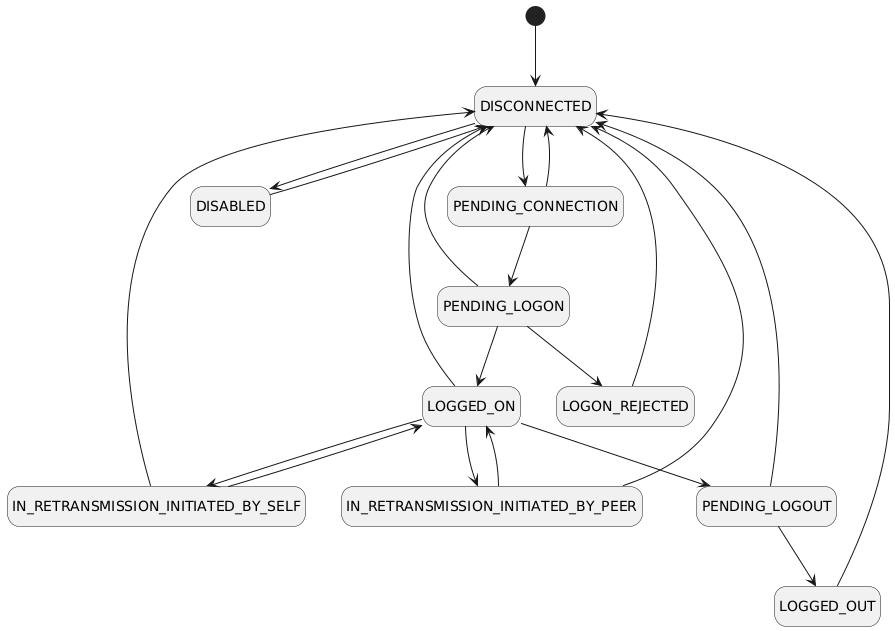
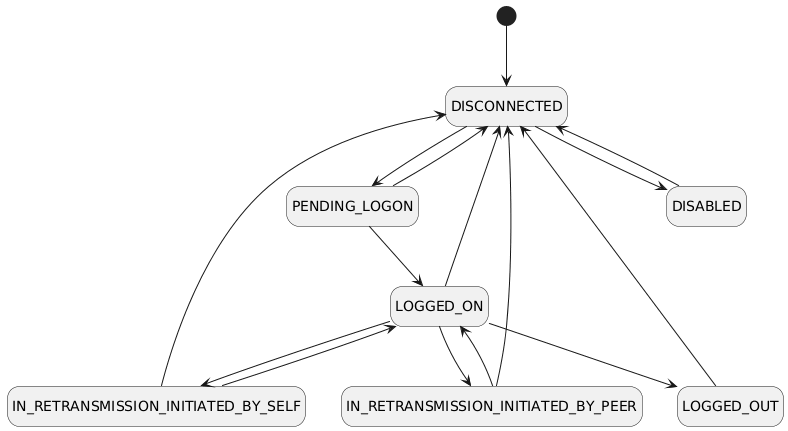
An llfix engine FIX session can be in one of the following states:
| State | Description |
|---|---|
| DISABLED | Session is administratively disabled. |
| DISCONNECTED | Session is not connected to the peer. |
| LOGGED_OUT | Session is disconnected after a successful logout. |
| LOGON_REJECTED | Logon attempt was rejected by the peer. |
| PENDING_CONNECTION | TCP connection established, waiting to initiate logon. |
| PENDING_LOGON | Logon message sent, awaiting logon response. |
| PENDING_LOGOUT | Logout message sent, awaiting completion. |
| LOGGED_ON | Session is logged on and fully operational. |
| IN_RETRANSMISSION_INITIATED_BY_SELF | Session is retransmitting messages initiated by this side. |
| IN_RETRANSMISSION_INITIATED_BY_PEER | Session is retransmitting messages initiated by the peer. |
Note about logouts : On the client, state LOGGED_OUT represents completion of the logout handshake (logout sent and response received). On the server, LOGGED_OUT represents that a Logout message has been received from the peer. The server typically disconnects immediately after sending its Logout response and therefore does not enter a separate PENDING_LOGOUT state.
FIX client state transitions are as below :
FIX server state transitions are as below :
Fixed points
Using fixed points are much more performant compared to floating points and doubles and already most electronic trading venues use fixed-point prices and quantities. llfix engine provides an unsigned fixed point abstraction (llfix::FixedPoint) that can be used as below :
llfix::FixedPoint is a purpose-specific unsigned fixed-point type and is not intended for general-purpose numeric use. Its design imposes several usage constraints; please review the entire llfix::FixedPoint API reference carefully before using it.
TCP Admin interface
When the TCP administration interface is configured, it is started automatically by llfix::Engine::on_start.
Once initialised, you must register your FIX server or FIX client with the management server in order to expose it:
Note that, at the end of your program’s lifecycle, the TCP administration interface must be stopped before shutting down your instances:
The examples in the examples directory demonstrate these API calls.
Persistency plugins
You can create your custom message persister by deriving from llfix::MessagePersistPlugin interface and implementing its methods :
To enable it you need to call llfix::FixClient::set_message_persist_plugin or llfix::FixServer::set_message_persist_plugin.
You can find "my_message_persister.h" example under "tests/fix_server_automation/server".
When using a custom message persistence plugin, you can disable the built-in message serialisation for a specific session by setting the max_serialised_file_size configuration parameter to 0 for that session.
Session specific data
llfix::FixSession allows applications to associate data with FIX sessions via llfix::FixSession::add_attribute and llfix::FixSession::get_attribute. When adding an attribute, you must specify a name, which should be reused during retrieval. Supported value types:
- std::string
- Arithmetic types (converted via std::to_string)
- Any type supporting stream insertion (operator<<)
An llfix::FixSession can be accessed via llfix::FixClient::get_session or llfix::FixServer::get_session.
Validations
Note: Session protocol mechanics (sequence number handling, resend requests, gap fills, heartbeats and test requests) are implemented as part of the FIX session state machine and are not listed under validations.
For configuration options to enable or disable validations, please refer to section 1.3.7, FIX Session configs, Validations. Note that fundamental validations, such as parser-level checks, cannot be disabled.
llfix performs validations in several categories:
Parser level
- Missing equals sign (=)
- Tag with no value
- Duplicate tag (excluding repeating groups)
- Non-numeric tag
Message level
- Missing tag 8
- Missing tag 9 or non-numeric tag 9 value
- Missing tag 10 or non-numeric tag 10 value
- Missing tag 34 or non-numeric tag 34 value
- Missing tag 35
- Missing tag 49
- Missing tag 56
- Incorrect body length (tag 9)
- Invalid checksum (tag 10)
- Incorrect tag ordering in headers (tag 8, tag 9, tag 35)
Session level
- Invalid SenderCompID
- Invalid TargetCompID
- Invalid FIX protocol version
Time based
- Tag 52 staleness validation (has its own configuration, disabled by default)
FIX server logons
- Missing tag 98 (encryption method)
- Missing tag 108 (heartbeat interval)
- Invalid tag 108 (heartbeat interval)
- Duplicate logon
Dictionary based
- Invalid message type, message does not exist in the dictionary
- Invalid tag, tag does not exist in the dictionary for a specific message type
- Missing required tag, a required tag for a specific message type is missing
- Undefined tag, field does not exist in the dictionary
Dictionary based, allowed values
Validated data types are as below:
- int
- float
- boolean
- timestamp
- timeonly
- dateonly
Dictionary based, repeating groups
The following validations can be performed for repeating groups that are marked as 'required':
- Missing count/leading tag
- Multiple required group count/leading tags
- Non-numeric count/leading tag
Administration
Message serialisations & deserialiser tool
Messages are recorded in a binary format for speed per direction (incoming & outgoing). You should use the deserialiser command line tool in order to view the recorded messages.
Deserialiser can be found in "tools/deserialiser" directory. To build it :
- make release on Linux
- run build_msvc.bat or use VisualStudio project file on Windows.
CLI options are :
| Option | Description |
|---|---|
| -i <path> | Input serialisation path |
| -o <file> | Output file |
| -e | Exclude timestamps from output |
| -t | Use tag names instead of numbers |
While specifying an input path, it can contain multiple subfolders. It will be recursively searching for all message serialisations and sort them based on serialisation timestamp.
By specifying -t, you can also get textual descriptions instead of tag numbers :
Sequence stores
Sequence numbers for each session are stored in a binary format. If modification is required for any reason, it can be performed using the Sequence Store Manager tool.
The source code for this tool is located in tools/sequence_store_manager. To build it:
- make release on Linux
- run build_msvc.bat or use VisualStudio project file on Windows.
Once built, the tool can be executed from the command line to modify and verify sequence store files.
Admin Gui
Introduction
The llfix engine provides a built-in TCP-based management interface for runtime control, inspection,
This interface is intended for:
- The bundled Python CLI admin client
- Programmatic administration
- The Admin GUI
It is not part of the FIX data plane and does not affect trading latency or session message flow.
The management interface allows operators to:
- Inspect engine runtime information
- Query and manage FIX clients and FIX servers
- Inspect and control FIX sessions
- Perform operational recovery actions (e.g. sequence number control)
- Support high-availability setups (primary / secondary roles)
All operations are performed live, without restarting the engine.
As the interface is intentionally lightweight, it doesn't use encryption. Therefore it must be deployed in a trusted environment.
The Admin GUI is implemented using Qt 6.7.3. A list of supported operating systems is available in the Qt 6.7 Supported Platforms documentation.
To run the Admin GUI:
- Windows: The executable and all required DLLs are located in tools/admin_gui/bin_windows. This directory is fully self-contained and can be run directly.
- Ubuntu: Use the admin_gui.sh launcher script found in tools/admin_gui/bin_linux. Ensure the script is executable with "chmod +x ./admin_gui.sh". This directory includes all required shared libraries and is fully self-contained.
Building
The Admin GUI is implemented using Qt 6.7.3 and dynamically links against the Qt shared libraries (shared objects on Linux and DLLs on Windows).
To build the Admin GUI, Qt Creator must be installed on the system.
Once Qt Creator is available, open the provided Qt project file admin_gui.pro, located in tools/admin_gui/src, and build the project using Qt Creator.
Usage
To connect to an instance running the llfix engine:
- From the Main menu, select Connect.
- In the connection dialog, specify the IP address and port, then click Connect
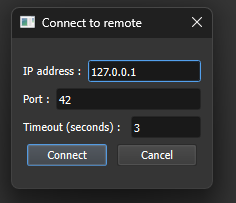
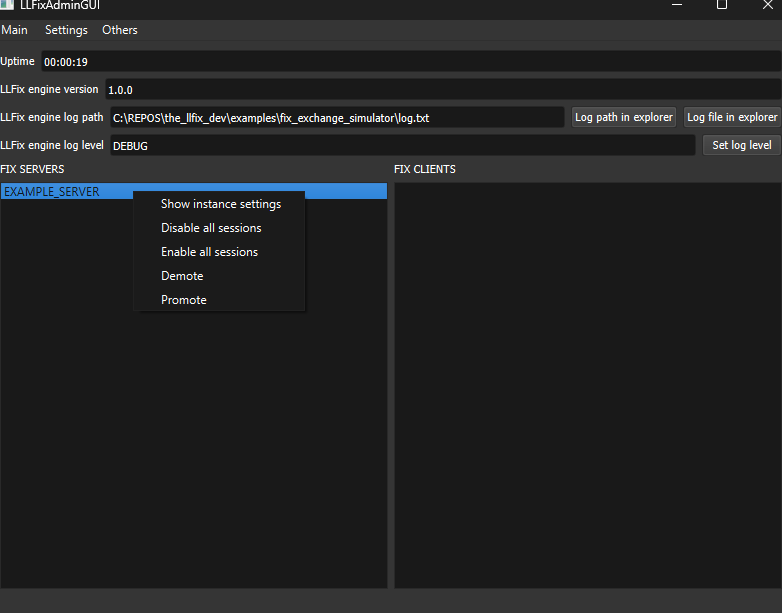
After establishing a connection, you will be taken to the main screen. This screen displays the uptime, llfix engine version, current log level, and all registered FIX server and FIX client instances.
From this screen, you can change the log level without restarting the running application :
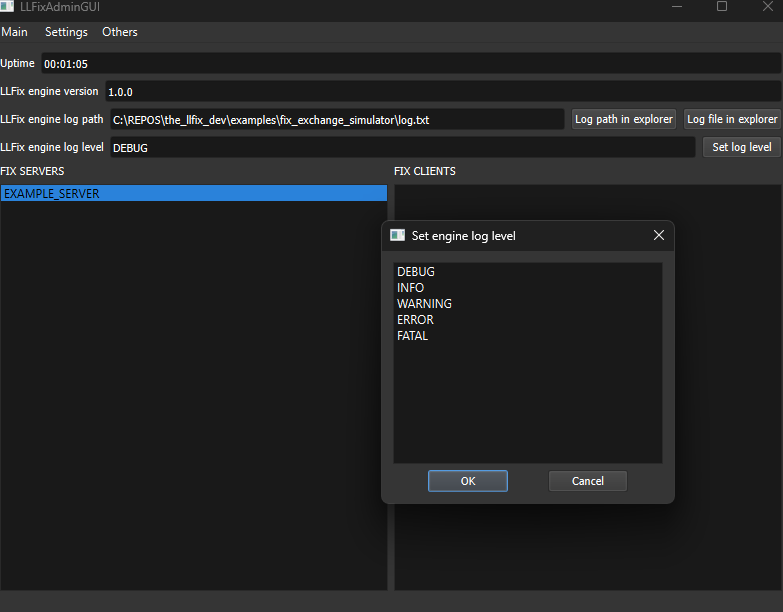
If you right-click on any instance, the instance context menu provides the following options:
- Show Loaded Instance Configuration
- Disable All Sessions
- Enable All Sessions
- Demote (High Availability)
- Promote (High Availability)
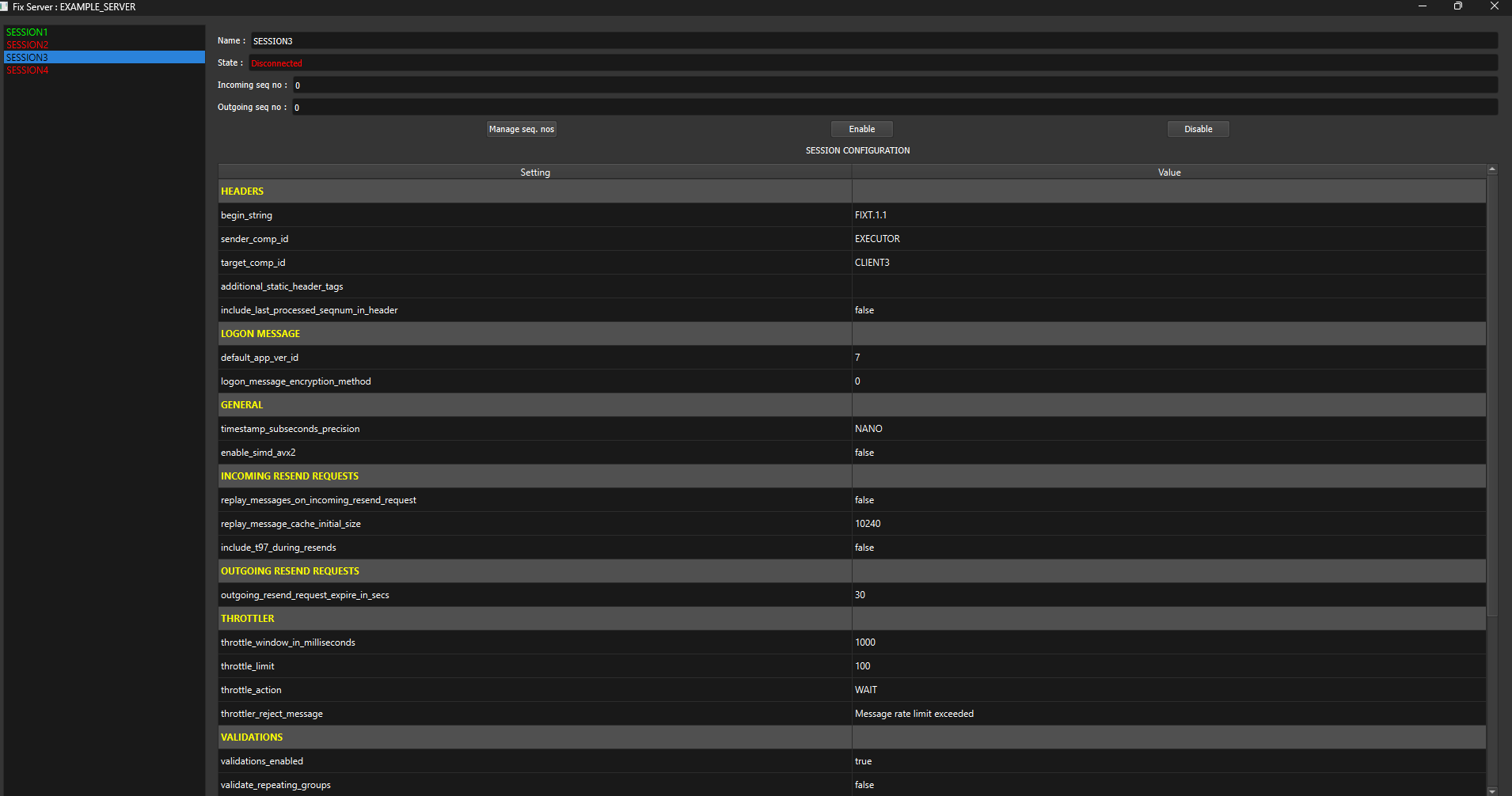
After double-clicking an instance name, the Instance Dialog opens, displaying a list of sessions within that instance. Clicking on a session name will open the Session Screen.
In the Session Screen, you can view the session state, sequence numbers, and the loaded configuration information :
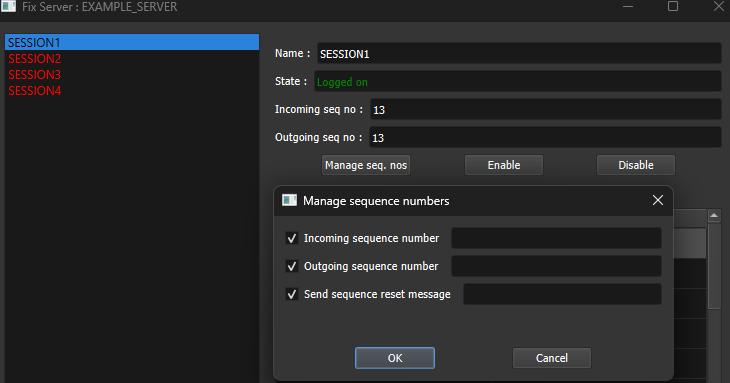
Clicking “Manage Seq. Nos” opens the Session Sequence Number Management screen. From here, you can:
- Set the incoming sequence number
- Set the outgoing sequence number
- Send a Sequence Reset message to the connected peer
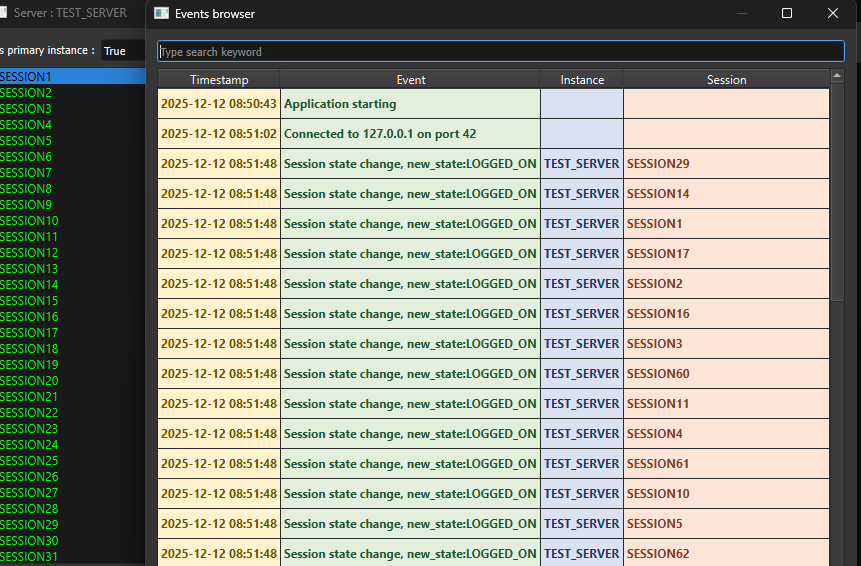
From the Main Menu, click “Others” and then “Events Browser” to open the Events Browser window. Here, you can monitor and filter events such as session state changes, sent administrative commands, and more.
Port forwarding
To remain lightweight, the llfix engine and Admin GUI communicate over plain TCP. In environments where encrypted transport is required, such as accessing a colocation site over SSH, TCP traffic can be secured using SSH port forwarding.
The steps below describe how to configure local port forwarding using PuTTY:
- Launch PuTTY
- Navigate to Connection → SSH → Tunnels.
- In the Source port field, enter the local port on your client machine.
- In the Destination field, specify the IP address and port of the remote TCP server.
- Ensure the Local radio button is selected.
- Click Add to register the forwarding rule.
- Return to the Session category and click Open to initiate the SSH connection.
- After logging in to the remote server, the port forwarding tunnel is active.
Admin CLI & programmatic administration
You can find "admin_client.py" under tools directory. Its usage is as below:
The table below lists the available admin interface commands and their descriptions :
| Command | Description |
|---|---|
| help | Display all available admin CLI commands |
| get_uptime | Show engine uptime since startup |
| get_engine_version | Return the running llfix engine version |
| get_engine_log_path | Display the current engine log file path |
| get_engine_log_level | Show the active engine log level |
| set_engine_log_level <log_level> | Set engine log level (ERROR, WARNING, INFO, DEBUG) |
| get_clients | List all registered FIX client instances |
| get_servers | List all registered FIX server instances |
| get_instance_config <client/server> | Display configuration of a client or server instance |
| set_is_instance_primary <c/s> <1/0> | Promote (1) or demote (0) an instance to primary role |
| is_instance_primary <client/server> | Check whether an instance is currently primary |
| get_sessions <client/server> | List all FIX sessions for a given instance |
| get_session_state <c/s> <session> | Return the current state of a FIX session |
| get_session_config <c/s> <session> | Display configuration of a FIX session |
| get_all_session_states | Show states of all sessions across all instances |
| enable_session <c/s> <session> | Enable a FIX session |
| disable_session <c/s> <session> | Disable a FIX session |
| get_incoming_sequence_number <c/s> <session> | Get current incoming sequence number |
| get_outgoing_sequence_number <c/s> <session> | Get current outgoing sequence number |
| set_incoming_sequence_number <c/s> <session> <no> | Set incoming sequence number |
| set_outgoing_sequence_number <c/s> <session> <no> | Set outgoing sequence number |
| send_sequence_reset <c/s> <session> <no> | Send FIX sequence reset |
You can also programatically send admin commands to manage your sessions using Python. You can find 'programmatic_administration' under examples directory.
Logs
You can find the logger configuration options in the Engine Configs section of the llfix documentation.
The llfix logger supports the following severity levels:
FATAL, ERROR, WARNING, INFO, DEBUG
During initialisation, log messages use the INFO, WARNING, and ERROR severities. The FATAL severity is reserved for critical failures, such as memory allocation errors or failures when creating memory-mapped files.
Validation errors are logged using the ERROR severity.
Note that the logger severity can be changed at runtime via the Admin GUI without restarting the instance.
High availability
Overview
Sequence numbers and messages are synchronised reliably using a TCP-based HA Syncer. Synchronisation follows a receiver-driven model to minimise network load. Note that clustering across multiple servers is not supported, HA is limited to primary/secondary failover using the HA Manager.
Automatic promotion and demotion ensure uninterrupted FIX sessions, while the HA Manager guarantees continuous availability through TCP-based leader election. Manual failovers can also be performed via the Admin GUI.
Primary and Secondary Instance Roles
Each FIX server/client instance operates in either a primary or secondary role, as determined by the starts_as_primary_instance configuration setting.
- When starts_as_primary_instance is set to false, the instance starts in the secondary role and all FIX sessions are disabled.
- When starts_as_primary_instance is set to true, the instance starts in the primary role and all FIX sessions are enabled.
HA Syncer
The HA Syncer executable operates in dual mode, meaning it can both send and receive data. The initially_supporting_primary_instance configuration determines whether the parent instance starts as primary or secondary :
- If the parent instance is secondary: The Syncer operates as a receiver. It actively sends synchronisation queries
- If the parent instance is primary: The Syncer operates as a sender. It responds to incoming synchronisation queries
Each syncer runs an admin client connected to its parent instance to query the current HA role (primary or secondary).
If the parent instance’s admin interface is unreachable, the Syncer enters an unknown state and remains inactive until connectivity is restored.
Data transfer is receiver-driven, as outlined below:
- The secondary instance’s Syncer (receiver) sends a query for a specific session.
- The primary instance’s Syncer (sender) responds with the sequence numbers and the latest messages.
- After receiving a response, the receiver updates sequence numbers and sends requests for new messages.
Promotions and demotions
Both FIX client and FIX server instances support the administrative command set_is_instance_primary, which controls whether an instance operates as a primary or secondary node :
- When an instance receives set_is_instance_primary 0, all FIX sessions are disabled.
- When an instance receives set_is_instance_primary 1, all FIX sessions are enabled.
Syncers determine the operational state of their parent instance by issuing the is_instance_primary query. Based on the returned value, a syncer will automatically switch its mode between receiver and sender.
HA Manager and automatic failovers
The HA Manager executable is responsible for high-availability orchestration:
- It detects failure of the current primary instance and promotes a secondary instance to primary.
- It also enforces correctness by demoting any instance that incorrectly claims to be primary, including a previously failed primary or any other rogue instance.
Note that instance promotion and demotion can also be performed manually via the administrative GUI.
Setup
You can find an example setup under "tests/other_networked_tests/high_availability" folder.
FIX Server/Client instances
- Both primary and secondary instances should be running TCP admin interfaces. Please refer to engine configs.
- Primary instance should have starts_as_primary_instance=true config.
- Secondary instance should have starts_as_primary_instance=false config.
HA Syncers
HASyncer is located in the tools/high_availability_syncer directory. To build it:
- On Linux: run make release
- On Windows: run build_msvc.bat or open the Visual Studio project file
You will need two configuration files: one for the primary instance and one for the secondary instance. Example configs are provided in the tools/high_availability_syncer/ directory.
HASyncer configuration descriptions:
| Config | Description | Default |
|---|---|---|
| initially_supporting_primary_instance | Whether the parent instance initially acts as the primary | false |
| log_file | Path to the file where logs will be written | log.txt |
| log_level | Logging verbosity level. One of : ERROR WARNING INFO DEBUG | INFO |
| log_queries | Enable or disable logging of query messages | false |
| log_message_syncs | Enable or disable logging of message sync messages | false |
| sender_nic_ip | IP address of the network interface card used by the sender | |
| sender_port | Port number the sender will use for communication | |
| sender_cpu_core_id | CPU core ID to which the sender thread is pinned. -1 disables pinning | -1 |
| receiver_nic_ip | IP address of the network interface card used by the receiver | |
| receiver_target_ip | Target IP address the receiver will listen to | |
| receiver_target_port | Target port number the receiver will listen to | |
| receiver_cpu_core_id | CPU core ID to which the receiver thread is pinned. -1 disables pinning | -1 |
| sync_query_interval_microseconds | Periodic query interval in microseconds | 100000 |
| sync_outgoing_messages | Synchronise outgoing FIX messages | true |
| sync_incoming_messages | Synchronise incoming FIX messages | true |
| max_message_batch_size | Maximum number of incoming or outgoing messages that can be requested per network message | 10000 |
| serialiser_worker_thread_count | Number of threads to use for serialising message on the receiver size. 0 sets the thread count to the number of physical CPU cores on the host. | 1 |
| message_request_retry_microseconds | Time to wait before retrying pending message sync request. 0 disables it. | 0 |
| parent_instance_name | Name of the parent instance to connect to | |
| parent_instance_admin_ip | IP address of the parent instance's admin interface | |
| parent_instance_admin_port | Port number of the parent instance's admin interface | |
| parent_instance_admin_client_nic_ip | NIC IP used by the admin client when connecting to parent | |
| parent_instance_admin_client_query_interval_milliseconds | Interval in milliseconds between admin client queries | 1000 |
Additionally, an HASyncer configuration must include settings for the sessions it will be syncing. The example below defines four different sessions. Note that all session attributes must begin with SESSION:
Important: Configured sequence stores must be available before starting HASyncer. In other words, the FIX client/server instances should be started first.
Measure synchronisation throughput and latency under your expected workload and tune max_message_batch_size and serialiser_worker_thread_count accordingly :
- max_message_batch_size affects how many requested incoming or outgoing messages can be packed into a single query response network message.
- serialiser_worker_thread_count controls the number of worker threads used to serialise those messages. Setting it to 0 automatically uses the number of physical CPU cores on the host.
HASyncer's reliability is governed by the message_request_retry_microseconds configuration. Tune this value based on your network latency and reliability requirements.
HA Manager
HAManager is located in the tools/high_availability_manager directory. To build it:
- make release on Linux
- run build_msvc.bat or use VisualStudio project file on Windows.
You will need one configuration file for your single HAManager instance. An example config is provided in the tools/high_availability_manager/ directory.
HAManager configuration descriptions:
| Config | Description | Default |
|---|---|---|
| log_file | Path to the file where logs will be written | log.txt |
| log_level | Logging verbosity level. One of : ERROR WARNING INFO DEBUG | INFO |
| failover_timeout_milliseconds | Maximum time to wait for a failover to complete before giving up | 10 |
| promotion_try_wait_milliseconds | Delay between attempts to promote a secondary instance to primary | 1 |
| demotion_try_wait_milliseconds | Delay between attempts to demote a misbehaving or rogue primary | 1 |
| initial_leader_finding_timeout_milliseconds | Timeout for discovering the current primary when starting up | 1000 |
| initial_new_leader_assignment_timeout_milliseconds | Timeout for assigning a new leader during initial startup | 2000 |
Additionally, an HAManager configuration must include settings for instances it will be managing. The example below defines two instances. Note that all instance attributes must begin with INSTANCE:
Working with Solarflare TCPDirect
Overview
Solarflare Onload accelerates networking by implementing the BSD sockets API in user space, allowing applications to run without recompilation. Solarflare TCPDirect bypasses the BSD sockets interface and its associated semantics to achieve even lower latency.
In llfix, you must derive your FIX client implementation from llfix::FixClient<llfix::TCPConnectorTCPDirect> in order to use TCPDirect for your FIX clients. Additionally you also must specify nic_name and nic_address configurations for your FIX clients.
You can also find "tcpdirect_fix_client" example under "tests/other_networked_tests" directory.
There are several important differences compared with regular operating system sockets:
- Solarflare TCPDirect does not support loopback. To operate correctly, the NIC must have an active physical link.
- When TCPDirect is used, the data path differs from the standard kernel networking stack. As a result, conventional packet capture tools will not function. For troubleshooting, you can use the zf_stackdump utility, which is documented in the the official Solarflare TCPDirect documentation. For packet capture capabilities, please contact AMD regarding their toolchain.
Huge pages requirement
TCPDirect relies on virtual memory huge pages. As a result, the system must be configured with a sufficient number of huge pages before TCPDirect can be used.
TCPDirect utilises virtual memory huge pages; therefore, your system must be configured with a sufficient number of huge pages. Each TCPDirect stack typically consumes at least 10 huge pages, and the llfix implementation uses one TCPDirect stack per FixClient.
If you want to reduce huge page consumption, see Using shared TCPDirect Stacks below.
Limited PIO resources
PIO resources are limited on Solarflare NICs. This limitation constrains the maximum number of FIX clients that can use private TCPDirect stacks concurrently.
Once available PIO resources are exhausted, additional TCPDirect stacks cannot be created. For more details, refer to the official Solarflare TCPDirect documentation.
To mitigate PIO resource limitations, see Using shared TCPDirect Stacks below.
Using shared TCPDirect stacks
It is possible to reuse a shared TCPDirect stack across multiple FIX client instances in order to:
- Reduce huge page consumption
- Increase the number of FIX clients
The "tcpdirect_fix_client" example under "tests/other_networked_tests" also demonstrates how to create and use shared TCPDirect stacks.
IMPORTANT: When a TCPDirect stack is shared, it must be accessed by only a single thread. Unlike private stacks, shared stacks do not support multi-threaded FIX clients. Consequently, all FIX clients using a shared TCPDirect stack must operate in a single-threaded manner.
Continuous incoming data processing requirement
Compared with operating system sockets, TCPDirect provides greater control but requires more manual management. When writing your application, you must ensure that llfix::FixClient::process is called sufficiently often, as this call continuously advances the TCPDirect stack.
It is important to note that this requirement applies even to applications that only transmit data and do not explicitly receive any. In such cases, llfix::FixClient::process must still be invoked in order to process TCP acknowledgements for the TCPDirect stack. Failing to do so may lead to jitter, high tail latencies and hangs.
SSL
Overview
The outline of the SSL implementation is as follows:
- The supported OpenSSL library version is 3.6 or later, with 3.6 as the minimum requirement.
- The supported certificate and key file format is PEM. You can use OpenSSL utilities to convert certificates from other formats, such as PKCS#12 (.p12 / .pfx), to PEM if required.
Sigpipe signal
The current implementation configures the entire process to ignore SIGPIPE signals on Linux. This is primarily due to the fact that SSL_write does not provide an equivalent to the MSG_NOSIGNAL option available with BSD sockets.
Continuous incoming data processing requirement
When using OpenSSL, you must ensure that llfix::FixClient::process() is called frequently enough to adequately drain the receive (RX) path. Failing to do so can prevent the TLS state machine from making progress and may lead to stalls, hangs, or apparent deadlocks during send operations.
Tuning
System
For optimal server operation, the following conditions are recommended:
- CPU frequency should be maximised to ensure consistent low-latency performance.
- A sufficient number of isolated CPU cores should be available. Core isolation and pinning are supported by llfix through the relevant CPU core ID configuration parameters.
For further guidance on system-level tuning, the RHEL Low Latency Tuning Guide is a useful reference, as it provides comprehensive recommendations for optimising operating system and network performance.
llfix settings
Several llfix configuration parameters may affect performance:
- FixClient, FixServer, and the TCP administration interface expose CPU core ID configuration options, which are used for thread pinning. Pinning threads to specific cores reduces context switching and improves cache locality, resulting in lower latency and more predictable performance.
- Setting enable_simd_avx2=true enables SIMD acceleration for FIX checksum calculation and validation.
- The numa_bind_node and numa_aware_allocations may be used to influence the initial memory allocations performed by llfix. Note that for numa_aware_allocations to take effect, the numa_bind_node parameter must also be specified. NUMA-aware allocation can reduce memory access latency.
llfix::FixedPoint
The use of llfix::FixedPoint is strongly recommended in preference to floating-point types (float and double) wherever possible. The llfix::FixedPoint class is described in detail in the Using the API section.
Dictionary trimming
Remove all unused FIX fields, message types, and repeating groups. A leaner dictionary reduces validation overhead and results in more predictable latency.
Third party licences
The product uses or optionally supports the following third-party components, along with their respective licences:
- Deserialiser and code generator tools use cxxopts library ( MIT ) : https://github.com/jarro2783/cxxopts
- AdminGUI uses Qt (GNU LGPL) : https://www.qt.io/licensing
- Benchmarks and test suites use Quickfix and Quickfix dictionaries (The QuickFIX Software Licence) : https://github.com/quickfix/quickfix
- Benchmarks use Fix8 (LGPL-3.0) : https://github.com/fix8/fix8
- Test suites use tinyfix (MIT) : https://github.com/CorewareLtd/tinyfix
- Optional AMD Solarflare TCPDirect (MIT) : https://www.amd.com/en/support/ethernet-adapters/solarflare.html#downloads
- Optional LibNUMA (GNU LGPL) : https://github.com/numactl/numactl
- Optional tinyxml2 (Zlib) : https://github.com/leethomason/tinyxml2
- Optional OpenSSL (Apache 2.0) : https://github.com/openssl/openssl
- Documentation is generated using Doxygen (GPL v2) : https://www.doxygen.nl/
- Documentation styling uses doxygen-dark-theme (MIT): https://github.com/MaJerle/doxygen-dark-theme